PN AIS Survey
Based on
the proven Portable Navigator range of software
and now incorporated into Portable Navigator 7,
AIS Survey incorporates AIS
and Navigation data recording with advanced real time display and playback for
analysis of recorded data. This versatile software has been developed over a
long period and incorporates the requirements of many users. Applications
include:
·
AIS
RADAR for ships
·
Port
operations and VTS monitoring
·
Fleet
management
·
Voyage
recording for small ships
·
Incident
analysis based on recorded AIS data
Realtime
Perspective View of Shipping Pattern From Selected
Vessel
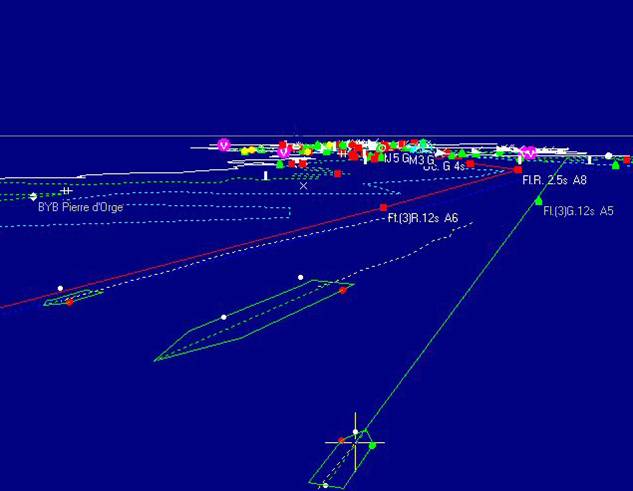
In this
example the navigation lights on the vessels are shown. The larger vessel
automatically has two masthead lights since it is over 50 mtrs
in length. The position of the port and starboard running lights are placed on
the hull outline opposite the GPS antenna position, which usually implies the
bridge wings.
Click to view a
PN AIS Survey - Features
·
AIS
and NMEA Data Recording and Real Time Display
·
Multiple
NMEA and AIS input channels and HS-NMEA
·
Playback
of recorded data with loop back and repeat options
·
Normal
Chart view (plan)
·
Perspective
view (3D)
·
Multiple
view Windows
·
Selectable
view direction i.e. look in any direction from view point
·
Variable
altitude in perspective view 3D mode
·
Selectable
view point including the bridge of any AIS target vessel
·
AIS
Target display with RADAR like “Lollipop” or simple ►target shape
·
Optional
AIS Target hull shape display based on AIS data
·
Optional
Heading Line and Range Rings from selected view point
·
Lights
can be displayed on AIS target based on
the ship’s AIS Navigation Status
·
Visibility
is controlled by the angle between view point and actual lamp positions
·
Optional
animated lights on buoys e.g. light flash characteristics of cardinals etc.
·
Voyage
recorder mode enables other data to be included with AIS data e.g. depth
·
Monitor
Mode for fixed shore based use, e.g VTS or Coastguard
Station
· Fleet management - Highlight all vessels tagged as fleet members. E.g. Tugs, Ferries etc.
·
Separate
AIS Target Data Panel to display all available AIS Data for selected vessel
· Automatic Target Database updated with each new target’s message type 5 data.
· The database is searched if a position report is received for instant vessel data display
· Incident analysis and save tools while playing back recorded AIS data.
· AIS SART personal emergency beacons decoded, recorded and displayed on the chart .
On playback of the data it is possible to stop at any point and make measurements of clearances etc., based on actual bow and stern positions allowing for true headings and not just course over the ground. The light visibilities are controlled by the angle between the view point and the actual position of the lamp in question, together with the heading of the target vessel and the arc of visibility of the type of lamp in the International Regulations.
In
addition, in the perspective view mode the vessel lights are controlled by the
Navigation Status of the target vessel as follows:
0. Underway
using engine Masthead(s) Running & Stern
1. At
Anchor All round Masthead(s) Stern & Bow
2. Not
under command Two vertical reds on fore mast
3.
Restricted Manoeuvrability Vertical red - white - red below masthead
4.
Constrained by her draught Three Vertical Reds below masthead
5. Moored All round Masthead(s) Stern and Bow
6. Aground Two vertical reds below fore
masthead
7. Engaged in fishing White over red on foremast + Running
and Stern
8. Under
way sailing Running & Stern + Red over green
on large vessels
PN AIS Survey - Dialogues and
Menus
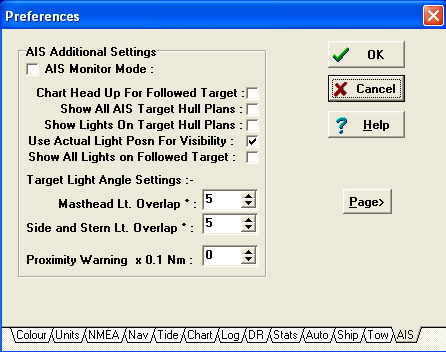
There are
various options available in the AIS Tab of the Preferences dialogue to control
the exact nature of the AIS display, as shown below.
Additional AIS Settings
AIS View Popup menu
In addition there is an AIS view
popup menu for each AIS view which provides many view specific options for the
AIS data display. This enables the user to control the annotation to the image
of the vessel’s name and MMSI number, to select the old target removal
algorithm and Target icon size and shape. Also users can select auto zoom for
the nearest target, the follow mode (i.e. locking the view point to the
selected target) and the orientation of the hull plan and heading to either
True Heading or COG.